Главная / Продукты / Actual Window Manager / Online User Manual / User InterfaceSpecific Settings Pane
The Specific Settings pane contains the following
functional areas:
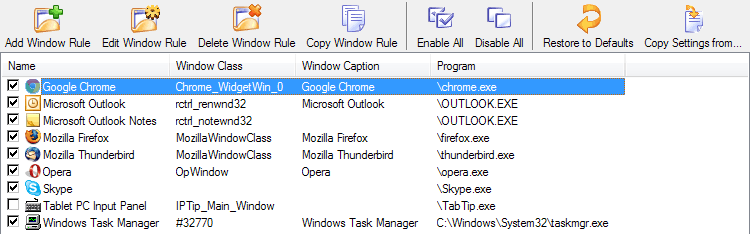
The Specific Settings toolbar provides the functions to manage the list
of specific settings:
 Add Window Rule - adds a new specific window rule. A new rule has the default name
Window n (e.g. Window 1, Window 2, etc.) and all its options are preset to the
values defined for the Default Settings rule.
Add Window Rule - adds a new specific window rule. A new rule has the default name
Window n (e.g. Window 1, Window 2, etc.) and all its options are preset to the
values defined for the Default Settings rule.
 Edit Window Rule - opens a separate window where you can customize the selected window rule's
target window options and properties
Edit Window Rule - opens a separate window where you can customize the selected window rule's
target window options and properties
 Delete Window Rule - deletes the selected specific window rule.
 Copy Window Rule - adds a new rule that is an exact copy of the selected Specific
Window rule.
Copy Window Rule - adds a new rule that is an exact copy of the selected Specific
Window rule.
 Enable All - enables all specific window rules.
 Disable All - disables all specific window rules.
 Restore to Default - resets the selected specific rule's settings to those defined in the Default Settings
rule.
Restore to Default - resets the selected specific rule's settings to those defined in the Default Settings
rule.
 Copy Settings from... - replaces the selected specific rule's settings with those defined
in another specific rule selected in the
Select Rule dialog.
Copy Settings from... - replaces the selected specific rule's settings with those defined
in another specific rule selected in the
Select Rule dialog.
In the Specific settings list each item represents a particular specific rule.
The list consists of the four columns:
- Name - shows rule's name
- Window Class - shows the string value provided for the Window Class criterion of rule's
Target Window criteria set
- Caption - shows the string value provided for the Window Caption criterion of rule's
Target Window criteria set
- Program - shows the string value provided for the Program criterion of rule's
Target Window criteria set
You can click on any column's header to sort the list ascending/descending by that column in alphabetical order
(by default, the list is sorted by the Name column).
Also, every item in this list has a check box on the left of its name. You can
mark/unmark this check box to enable/disable particular
rule.
You can select an item by:
- left- or right-clicking on its name
- using the cursor keys
- typing a few first letters of its name to jump to it quickly
In addition, you can double-click the selected item or press <Enter> on it to invoke the Edit Window Rule command.
|






