Главная / Продукты / Actual Window Manager / Online User Manual / User InterfaceTitle Buttons Options Panel
Available in:
Actual Window Manager,
Actual Title Buttons,
Actual Transparent Window,
Actual Window Minimizer,
Actual Window Rollup.
The Title Buttons Options panel allows to select the
skin for Actual Tools program's
additional title buttons.
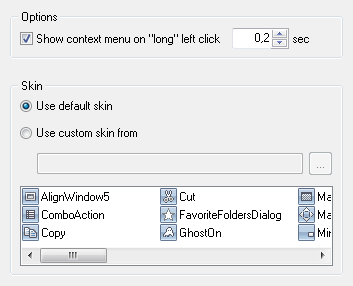
Skin group - contains the radio buttons allowing to choose the skin to use:
Use default skin radio button - mark it to let Actual Tools program load the
proper skin automatically for the following standard UI themes: Windows Classic, Windows XP Blue/Green/Silver, Windows Aero.
Use custom skin from radio button - mark it to set the custom skin.
Custom skin can be stored either in a distinct folder or in a ZIP archive. In the related edit box
you can either type the full path to the desired skin folder or ZIP archive or specify path relative to
Actual Window Manager's installation folder. Also, you can use the ... button
that opens the standard Windows® Open File... dialog where you can select the desired skin
folder or ZIP archive.
Skin Preview list box - shows the button icons of the currently used skin.
You can right-click this list box to choose the preferred icons view in the appeared context menu.
|






