Главная / Продукты / Actual Window Manager / Online User Manual / User InterfaceNumpad Panel
Available in:
Actual Window Manager,
Actual Title Buttons,
Actual Window Menu.
The Numpad panel allows customizing the key combinations for the
numpad hotkey groups:
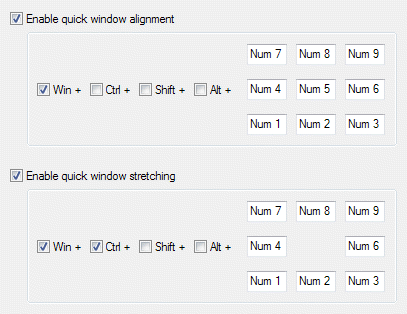
Enable quick window alignment check box - mark it to enable the Quick Alignment hotkey group. In the
related group of controls you can define the set of modifier keys and specify the alphanumeric key for each one of
9 pre-defined alignment positions (by default the Num1..Num9 keys are specified). If some of specified
combinations produce conflicts their hotkey boxes will become red-outlined;
Enable quick window stretching check box - mark it to enable the Quick Stretching hotkey group. In the
related group of controls you can define the set of modifier keys and specify the alphanumeric key for each one of
8 pre-defined directions of stretching (by default the Num1..Num9 keys are specified). If some of specified
combinations produce conflicts their hotkey boxes will become red-outlined.
|






