Главная / Продукты / Actual Window Manager / Online User Manual / User InterfaceControl Center User Interface
Since the Control Center is a small, memory-resident
application, its user interface is also small and simple to reduce the amount of required memory. It includes the
system tray icon and its context menu:
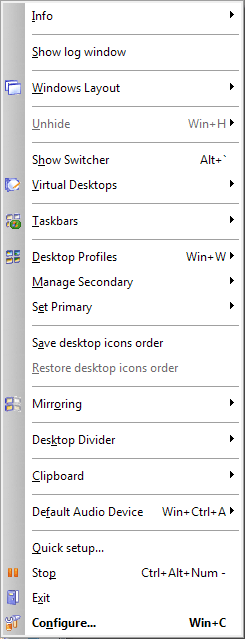
Configure... menu item - opens the main Configuration window
Exit menu item - stops processing the windows and shuts the Control Center down
Pause/Resume menu item - tells the Control Center to temporarily stop processing
windows/start it back
Quick setup... menu item - runs the Quick Setup wizard
Show/Hide application audio manager menu item - relates to
Per-application Audio Device Switcher facility:
click this item to open/close the
Application Audio Manager window.
Default Audio Device submenu - relates to Default Audio Device Switcher tool:

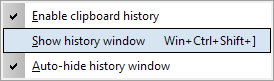
Clipboard submenu - allows to activate the
Clipboard History feature and to invoke
the Clipboard History window
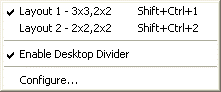
Desktop Divider submenu - allows activating the
Desktop Divider facility and its layouts
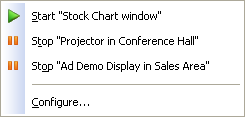
Mirroring submenu - lets you start/stop any of
available mirrors
Save/Restore desktop icons order menu items - relate to the
Desktop Icons Manager
Desktop profiles submenu - allows the quick activation of any of
existing desktop profiles:
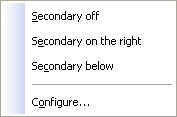
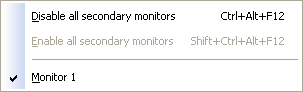
Manage Secondary submenu - provides the easy toggling of available
secondary displays on/off:
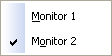
Set Primary submenu - lets you easily designate any available display as primary:
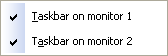
Taskbars submenu - provides the ability to toggle
secondary taskbars on certain monitors
Note
If you have enabled the Replace the primary taskbar option then you will be able
to hide a taskbar on any monitor but will be unable to hide the last visible taskbar.
Show/Hide Switcher menu item - toggles the
Virtual Desktops Switcher window
Virtual desktops submenu - allows switching between
existing virtual desktops:
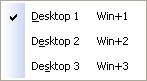
Unhide submenu - relates to Unhide tool:
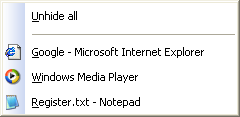
Unhide all command - click this item to restore all currently minimized windows at once
Other items correspond to certain currently minimized windows - click the desired item to restore its
corresponding window
Windows Layout submenu - relates to Windows Layout tool:
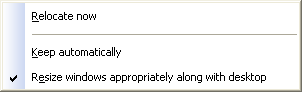
Relocate now menu item - invokes the manual relocation
Keep automatically menu item - enables/disables the automatic relocation. This menu item does the
same as this option
Resize windows appropriately along with desktop menu item - enables/disables the automatic resizing
of windows in addition to their relocation (either automatic or manual). This menu item does the same as
this option
Show/Hide log window menu item - relates to
Windows Monitoring Log tool: click this item to open/close the
Actual Window Manager Log window
Info submenu - contains the shortcuts to different information and service windows:
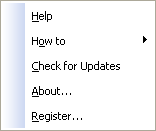
Help menu item - opens this Actual Window Manager Help window
How to submenu - contains the shortcuts to different Help articles explaining some frequently asked
questions
Check for Updates menu item - opens the Check for Updates window
About... menu item - opens the About dialog
Register... menu item - opens the Registration dialog
All the features of any Actual Tools program (including the Control Center
tray icon visibility) can be accessed via the
Configuration Module user interface.
|






